QL
Operational support that takes you beyond the 7-figure mark
Online Business Management Group Program and Mastermind
Business Coaches.
You haven't found your lane, you're dominating it.
But your operations doesn't reflect that.
Clients get results… but delivery feels heavier than it should.
The team is working… but not in sync. And still needing direction.
You’re still the bridge between every dept, every person, every decision.
Subconsciously, you've added these items to the "we'll cross that bridge when we get there" list. And now, it's time to cross the bridge. And it's going to be a lot harder to cross it with all you're carrying. It doesn't have to be this hard. With the right strategies and operations support in place, we can get over this bridge with ease.
You deserve an operations partner who sees your brilliance and protects your bandwidth.
Someone who brings brings structure to what you've been holding together with a tight fist. It's time to untighten it.
Your team moves in sync: Clear roles. Clear expectations. Clear communication (without everything flowing through you).
Launches run smoothly: Timelines, tasks, and touch points organized and executed without the chaos or last-minute scrambles.
Delivery feels consistent and clean: Programs and clients experience your brand at its highest standard — every time.
Meet My Clients Partners




"Working with Q, directly restored elements of myself and the business..."
"Working with Q, directly restore elements of myself and the business that I needed and I didn't know that that is what I was asking for we first conneted. I'm able to now remember why I started..."
- Mahdi, ceo of Mahdi woodard
Hey! I'm qwantel, but you can call me q
I'm here to bring you the "it's handled" energy you crave in your business.
For the past 7 years, I’ve managed and operationalized online businesses just like yours — from group programs and digital communities to high-volume coaching ecosystems with growing teams.
Meet My Clients Partners
"She's been a major asset to my business & life..."
"Truly, Qwantel has been a Godsend. I needed direction for the growth of my business. I knew what I saw in mind but it was hard to pull the pieces together. Qwantel led my thoughts into the tangible with a kind, patient, yet action-oriented fashion. She didn't allow any of my goals to fall through the cracks, keeping me in line by laying out content, processes and procedures to guide my trajectory. She's been a tremendous asset to my business and life. Qwantel is a professional that can be trusted to deliver with excellence in all she does. I'd highly recommend her."
- Kanishia, ceo of The kani hair group
Meet My Clients Partners
"A right-hand partner and data wizard all in one..."
"I love our dynamics in general! She thinks about the client delivery and she thinks about the data and operations and systems side of things. It' like having a right-hand partner and data wizard all in one..."
- taeler, ceo of taeler de haes
Meet My Clients Partners
"I discover something new, every single time we're together!"
"Q is definitely worth every single penny! Since working with her I feel confident that my backend is handled and I can focus on what I need to keep my business running. I discover something new every single time we're together..."
- jasmine, ceo of baddies and budgets
On the Ops Blog
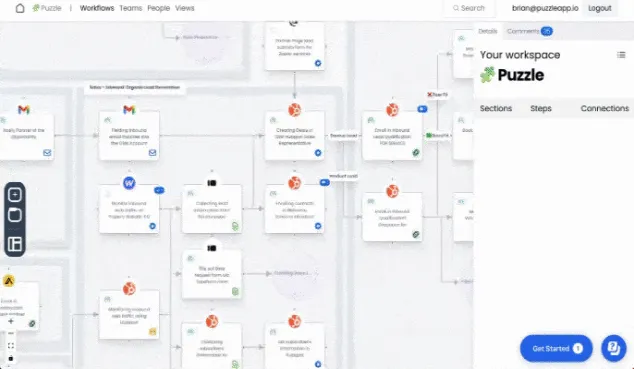
The Right Way to Document a Process (So People Actually Use It)
You’ve seen it before: that gray-zone project where no one has the full map, yet somehow you’re the one asked to “figure it out.”
As the operations or RevOps specialist, your job is to ask foundational questions, map the logic, and produce the unified doc that finally brings everyone onto the same page. That’s what a strong RevOps professional does — you create shared understanding.
But here’s the truth: very few people know how to do this well.
I’ve been through enough “process maps” and scattered SOP folders to realize there’s a better way to document. A way that makes sense to stakeholders, is easy for operators to follow, and becomes the single source of truth your team actually uses.
By the end of this post, you’ll know how to build two layers of documentation, anchor it with a visual, add a cheatsheet, organize by audience, and reinforce it until it becomes operational reality. You’ll even get a structure you can plug in immediately for faster setup and share-ability with your team.

Here’s what we’ll cover:
Step 1: Create the “Thinking” Layer
Step 2: Create the “Doing” Layer (SOP/Checklist)
Step 3: Use a Visual Anchor
Step 4: Add a Cheatsheet Block
Step 5: Organize by Audience
Step 6: Layer Access for Scalability
Step 6: Reinforce Through Repetition
Then, we’ll wrap with a few common mistakes and FAQs to save you time down the road.
Step 1 - Create the "Thinking" Layer
This is the high-level process overview — the document that answers, “Why are we doing this?” and “What does done look like?”
If you skip this and jump straight to the SOP, you’ll spend weeks fielding questions like:
“Who owns this step?”
“Where does this go after intake?”
“Wait—why are we even doing it this way?”
Key points / checklist:
Define the purpose (“why this exists”)
Identify owner + supporting teams
Note the trigger (what starts the process)
Specify systems/tools involved
Define the outcome (what done looks like)
Build a simple flow/diagram (we’ll get to visuals in Step 3)
Pro Tip: Keep this to one page. Your goal is to give context, not detail.
Step 2 - Create the "Doing" Layer (SOP/Checklist)
This layer is for the person executing the work — the operator, VA, or teammate on the front line. It should be so clear they can open it and act without asking “what now?”
How to build it:
List preconditions (what must exist before starting)
Write steps as short, actionable bullets
Include screenshots or Looms if helpful
Link templates, forms, or references
Add a troubleshooting section
Common mistakes to avoid:
Writing in paragraphs (“The user will then…”) instead of direct bullets
Assuming knowledge (skipping “log in to X”)
Forgetting exception paths or troubleshooting
Step 3 - Use a Visual Anchor
Humans are visual. A simple flowchart or puzzle map helps people see how everything connects long before they read a single line.
Key points:
Keep visuals to 5–7 boxes — any more, and it becomes noise
Label ownership clearly (“RevOps,” “Referrals,” etc.)
Use consistent icons or shapes
Pro Tip: Embed the same visual at the top of both docs (Thinking + Doing). It’s the shared compass that aligns everyone.
Step 4 - Add an Overview Section (Your Cheatsheet)
This is your “TL;DR.” The one block everyone will actually read.
Include:
Owner
Trigger
Goal
Primary tools
Teams involved
Key links (visual, SOP, dashboard)
Pro Tip: Place this directly below the title, in a shaded box or simple table. Make it impossible to miss.
Step 5 - Organize by Audience
Different people care about different parts of a process.
Executives want outcomes and ownership.
Operators want clarity and steps.
RevOps wants data accuracy and automation logic.
How to structure this:
Use sections like For RevOps, For Credentialing, For Referrals
Add audience-specific notes (“Credentialing: verify NPI before Step 3”)
Use collapsible sections if your doc platform allows it
Pro Tip: Write as if you’re documenting for someone outside your head. If a new hire could follow it confidently, you’ve nailed it.
Step 6 - Layer Access
This is where structure meets usability. Layered access mimics how adults learn and navigate: scan first, dive later.
Recommended structure:
Knowledge Base Overview → big-picture explanation, linked processes
Process Page → context, owner, links
SOP → step-by-step checklist
Resources → templates, screenshots, FAQs
This hierarchy keeps your documentation clean, scalable, and adaptable as processes evolve.
Step 7 - Reinforce Through Repetition
Even the best-written doc won’t stick unless you build it into your team’s rhythm.
Actions:
Add links to meeting agendas and onboarding templates
Pin it in Slack or your communication hub
Embed it in your project management tool (Asana, Monday, ClickUp)
Review monthly or quarterly
Pro Tip: Host a short “Process Walkthrough” meeting once per quarter. Ask your team, “What surprised you?” That question alone exposes blind spots.
Common Mistakes & FAQs
Mistake #1: One doc for everyone.
→ Solution: Split it into the Thinking (context) and Doing (SOP) layers.
Mistake #2: Over-complicated visuals.
→ Keep visuals short. If you need more, build decision trees in layers.
Mistake #3: No owner.
→ Publicly assign a name — ownership is clarity.
FAQ #1: What if the tool changes?
→ Update the SOP, note it in your changelog, and notify the team.
FAQ #2: Can we skip the visual?
→ Sure, if you love confusion. Don’t skip it. People need to see the system.
Wrapping Up
Most documentation fails because it lacks one of four things: context, visual, checklist, or ownership.
If you’re missing any of those, adoption dies.
Your challenge this week:
Pick one process in your business that’s fuzzy.
Create the two layers.
Add a visual.
Write the overview.
Organize by audience.
Then share it.
That’s how clarity becomes culture.
Thank you so much for reading!
Keep up the momentum with one or more of these next steps:
📣 Sharing helps spread the word, and you’ll look like a total genius when someone receives this blog recommendation from you. + Posts are formatted to be easy to read and share.
📲 Hang out with me on LinkedIn. Don’t be afraid to say hello or message me.
📬 Want to meet online? Schedule a call to connect with me. I'm happy to discuss system, RevOps and grow a new connection.
📊 f you’re unsure which tool fits your tech stack, I’ll map your process, system, and governance setup — and give you the rollout plan to match. Schedule a CRM Audit Discovery Call. to get started.


WATCH & LEARN
Weekly tips to build and
grow your OBM business.
SERVICES
all services
OBM Retainer
mentorship
QL
Streamlining Operations, Systems and Teams for eCommerce, group program and mastermind CEOs.
EXPLORE
speaking
view resources
visit the shop
At Qwantel Latay having to choose between scaling your business and showing up as your whole authentic self should never be a thing. Which is why on THIS side of Beyonce’s internet we fully celebrate all colors, genders, and lifestyles and fully back minority and LGBTQ led businesses.
And honey, if you can’t roll with that consider this one less tab in your browser to keep open.
privacy policy
terms & conditions
digital product terms and conditions
disclaimer
BACK TO TOP ↑