What is an SOP, actually?
A fresh take that challenges the norm (and shows you a smarter way).
Most "SOPs" I see in client accounts aren't SOPs. They're somebody's brain dump with a fancy title page. And I'm tired of pretending that's fine.
The acronym literally means Standard Operating Procedure. Procedure. A thing you do. The S isn't standing for "everything you might possibly need to know about this process." It's standing for "the standard way we operate, the same way, every time."
If it's not telling you what to do in what order — it's not an SOP. It's something else wearing the costume.
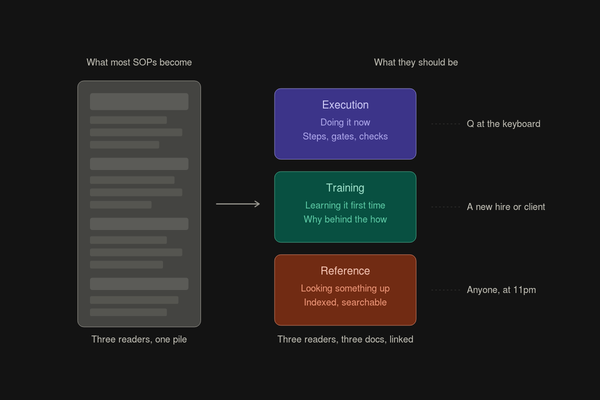
The three docs that get smashed into one
Here's the thing nobody tells you when you start documenting your business: there are three completely different documents people think are SOPs, and they all serve different readers at different moments.
The execution doc. Someone is doing the process right now. They have the context. They just need to not screw up the next 90 minutes. They want imperative steps — verb first, one action per step, no narration. They want gates at the top so they can confirm they're in the right doc before they start. They don't want explanation, they want signal.
The training doc. Someone is learning the process for the first time. They need to actually understand this, not just complete it once. They need the "why" alongside the "how" so when they hit an edge case, they have the judgment to handle it. This is a guide. This is a course. This might be a YouTube playlist.
The reference doc. Something broke. They've been through the process before. They need an answer in 30 seconds. They are not reading from the top — they're searching, scanning, jumping. This is a wiki. This is a Notion database. This is the appendix of a longer doc.
Three different readers. Three different moments. Three different formats.
The disaster is when one document tries to be all three.
Why most SOPs become 47 pages of nothing
Because nobody builds the other two docs, the SOP gets drafted into doing all three jobs.
New hire needs context? Add a "Background" section.
Someone got confused by an edge case? Add an "FAQ."
Someone hit an error? Add a "Troubleshooting" section.
Someone needed exact wording for an email template? Drop it inline in the middle of step 14.
Two years later you have a 47-page document that nobody reads because nobody knows what it is anymore. It's not a procedure. It's not training. It's not a reference. It's just stuff about the process. The format matches none of the three jobs, so it does all of them badly.
This is the moment where someone on your team says "nobody is reading all this lol" and they're right. They're not reading it because it's not a doc — it's a pile.
What a real execution SOP looks like
A real procedure does six things, and you can audit any SOP against them in about 90 seconds.
It opens with a gate, not an introduction. The first thing the doc answers is "is this even the right doc for me right now?" — what it produces, when you use it, when you don't, what you need before starting. Most SOPs open with backstory. Nobody cares. They want to know if they're in the right place.
Steps are imperative, atomic, and verifiable. Imperative means verb first ("Click the gear icon," not "You will click the gear icon"). Atomic means one action per step — if there's an "and" in there, it's two steps. Verifiable means at the end of the step, you can answer "did I do that, yes or no" without ambiguity. The "configure X appropriately" step is the death of SOPs. What does appropriately mean? Either define it, or it's not a step.
Decision points are flagged, not buried. Most procedures pretend everything is linear when there are real choices in there. When the person has to actually think — "are you Sole Prop or LLC?" — call it out as a decision. Don't bury it inside step 23 like it's another click. Branching belongs at the procedure level, not inside step text.
The unhappy paths get separated. Every SOP I see documents what to do when nothing goes wrong. Honestly, 80% of the value is in what happens when something does go wrong. People only need the happy path the first few times. After that, the unhappy paths are what they come back to. If your SOP doesn't have a "what if it breaks" section, it fails the moment something breaks.
State changes get confirmed. "After step 4 you should see X." This is what screen-recording tools don't capture naturally — they record the click but not the success state. Without confirmation states, people don't know when they're off the rails. They just keep clicking and end up somewhere wrong with no signal that they drifted.
Reference material is linked, not inlined. Exact-language templates, long checklists, edge-case tables — they live in an appendix or a separate doc. The minute you paste a 200-word legal clause into step 14, the procedure becomes unreadable.
Why screen-recording tools are quietly hurting documentation
I'll say what nobody wants to say: tools like Scribe are making documentation worse, not better.
Not because the output is bad — for what they do, they do it well. Trust me, I was TOO hype when I found out a tool like this existed, but as I've progressed in business I've learned where product documentation tools fall short.
The harm is that they let you skip the abstraction step. Real SOPs require thinking: "what should the next person do, and why?" Recording tools capture "what did I do," and people call that documentation. The thinking step is where the value is. That's the step you skip when you just hit Record.
The other cost of recording tools — a recording captures everything the practitioner did that day, including parts that depended on context only they had. They clicked through a workflow that only works because they'd already done X yesterday, but the recording doesn't say that. The next person follows it and fails for reasons no screenshot can explain.
Recording tools are good for: one-time hand-offs where someone just needs to replicate, not understand. Sketching the shape of a process before you write the real SOP. Capturing your own work so you don't forget what you did. They're a starting point, not the deliverable. The mistake is treating them as final documentation.
The image and video question
I'm picky about images in SOPs.
Software UI changes constantly. Screenshots from 2024 are already wrong, and any screenshot you put in an SOP today will be wrong by next quarter. So I skip screenshots for "click this button" steps. They rot fast and bloat the doc.
Where images earn their place is at decision points — moments where the person is most likely to fail. An annotated image of "what good looks like." The error state they should recognize. The form mockup with the right pieces in the right places. Maybe four to six images across an entire SOP, not one per step.
For genuinely confusing visual moments, short videos beat screenshots. Video survives UI drift — when a button gets renamed, the rest of the flow still tracks. Video shows live state changes in a way images can't. Your voice can warn people in a way text can't: "careful, this is the trap." The trade-off is video isn't scannable. If someone needs to find step 47, they're scrubbing.
The version that actually works in practice: video for orientation, written SOP for execution, targeted images at decision points. Watch the video once to understand the shape. Then work through the written SOP for the actual doing. Different layers, different formats, different jobs.
The format is the thinking
This is the deeper thing I keep coming back to.
A good procedure reveals that someone actually thought about the process. That's the test. If your SOP is structurally sloppy, the thinking behind it is sloppy too. You can't separate the two. The format is the thinking, made visible.
When I see a 47-page SOP with no gate at the top, no decision points called out, paragraphs of explanation mixed into step text, screenshots of every click, and no troubleshooting section — I don't see a documentation problem. I see a thinking problem. The author didn't actually distinguish between what someone needs to do versus what someone needs to understand versus what someone needs to look up. Those three things got smashed together because the thinking was smashed together.
The fix is harder than the problem looks. It's not a formatting fix. It's understanding what the doc is for, who's reading it, and what they actually need at the moment they're reading. Three different readers, three different docs, link them together, stop trying to make one document do all three jobs.
Read it out loud
The single best test of a procedure: read it out loud.
If it sounds like a person describing what they did — it's a recording.
If it sounds like a person telling someone else what to do — it's a procedure.
Recordings get longer over time. Procedures get tighter.
That's the difference.
Thank you so much for reading!
Keep up the momentum with one or more of these next steps:
📣 Sharing helps spread the word, and you’ll look like a total genius when someone receives this blog recommendation from you. + Posts are formatted to be easy to read and share.
📲 Hang out with me on another platform. I’m on Instagram, Youtube, and Threads. Don’t be afraid to say hello if you hang out on any of those. DM me and say hello.